
Room correction on Raspberry Pi
If a bass note booms at your listening seat, a small EQ cut can bring it back into balance. Kalinka 5.21.0 lets you adjust that EQ as you listen or load a correction filter made from measurements of your room. We optimized both kinds of processing so the Pi 4 that plays your music can handle the correction, too.
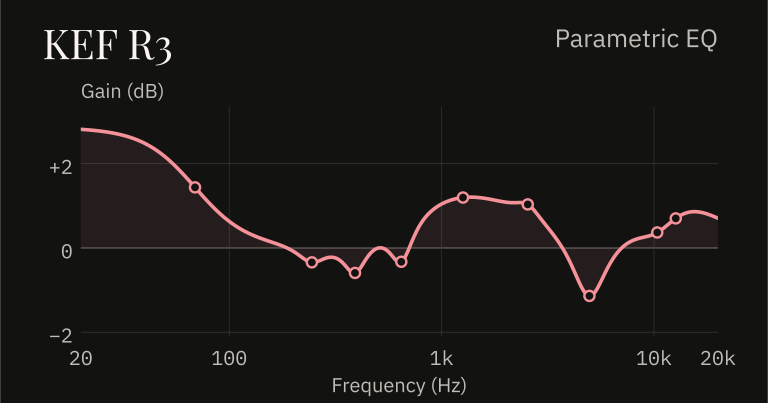
Speaker EQ across three engines
A parametric equalizer (PEQ) lets you set the frequency, width and gain of each band. Kalinka can import those settings from Room EQ Wizard. We gave Kalinka, CamillaDSP and KFR the nine-band KEF R3 preset shown above, then measured how much of one CPU core each needed for stereo at 192 kHz.
| Engine | Pi 4 | Pi 5 |
|---|---|---|
| Kalinka 0.17.0 | 0.48% | 0.33% |
| KFR 7.2.0 | 2.79% | 1.06% |
| CamillaDSP 4.1.3 | 2.06% | 1.14% |
| CamillaDSP 5.0.0-beta.2 | 0.88% | 0.41% |
With 20 bands per channel, Kalinka still used less than 1% of a Pi 4 core. CamillaDSP’s beta was the next closest, using about twice as much CPU on that board. All engines processed identical filters and samples on one thread, and we checked their output against the same reference.
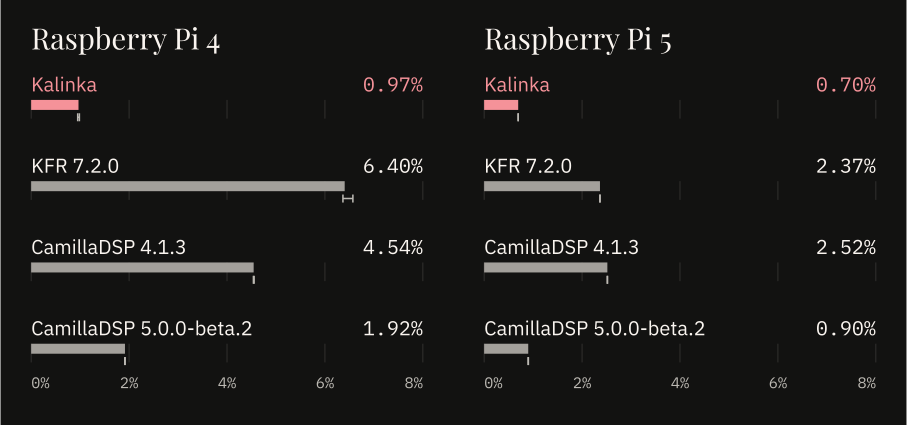
FIR room correction across three engines
A finite impulse response (FIR) filter can correct both level and timing. Kalinka reads that filter from a WAV file. Pi 4 listeners have combined EQ and FIR for years, and CamillaDSP’s author has run eight FIR channels at 192 kHz. One listener’s filter setup · CamillaDSP’s 192 kHz test
Each engine processed the same stereo audio at 192 kHz with a 262,144-tap filter per channel. Kalinka used the least CPU on average on both boards. Its biggest advantage came with the shortest buffer, where the engine has the least time to do its work.
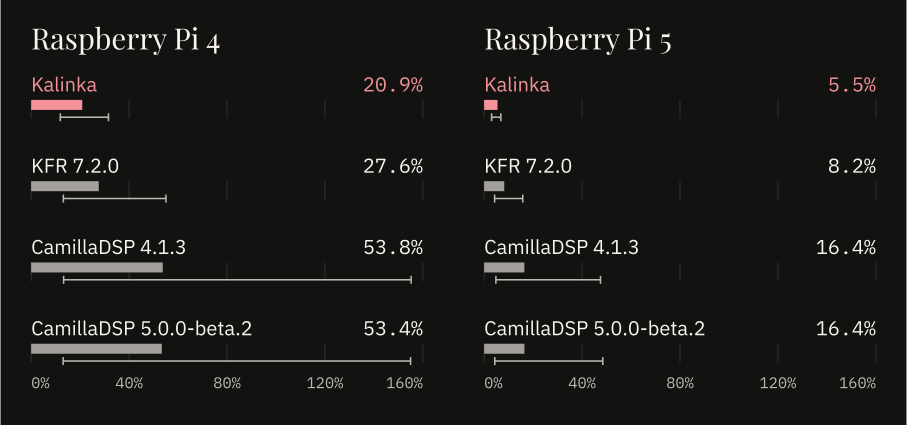
All engines ran on one thread. At 100%, processing uses a full core. Both CamillaDSP versions staggered the work for the left and right channels. Test setup and results by buffer size
What the results mean
At the shortest buffer, Kalinka applied the long FIR filter on the Pi 4 with 3.33 ms of added delay and roughly two thirds of one core to spare on average. It used the least CPU in seven of the eight matched FIR tests. At 8,192 frames on the Pi 5, CamillaDSP 5.0.0-beta.2 edged ahead at 5.20% to Kalinka’s 5.29% — less than a millisecond of CPU time per second of music.